
VoIP, Work Cell Phones, or Both? Choosing the Right Mix for Your Business
What VoIP Does Best
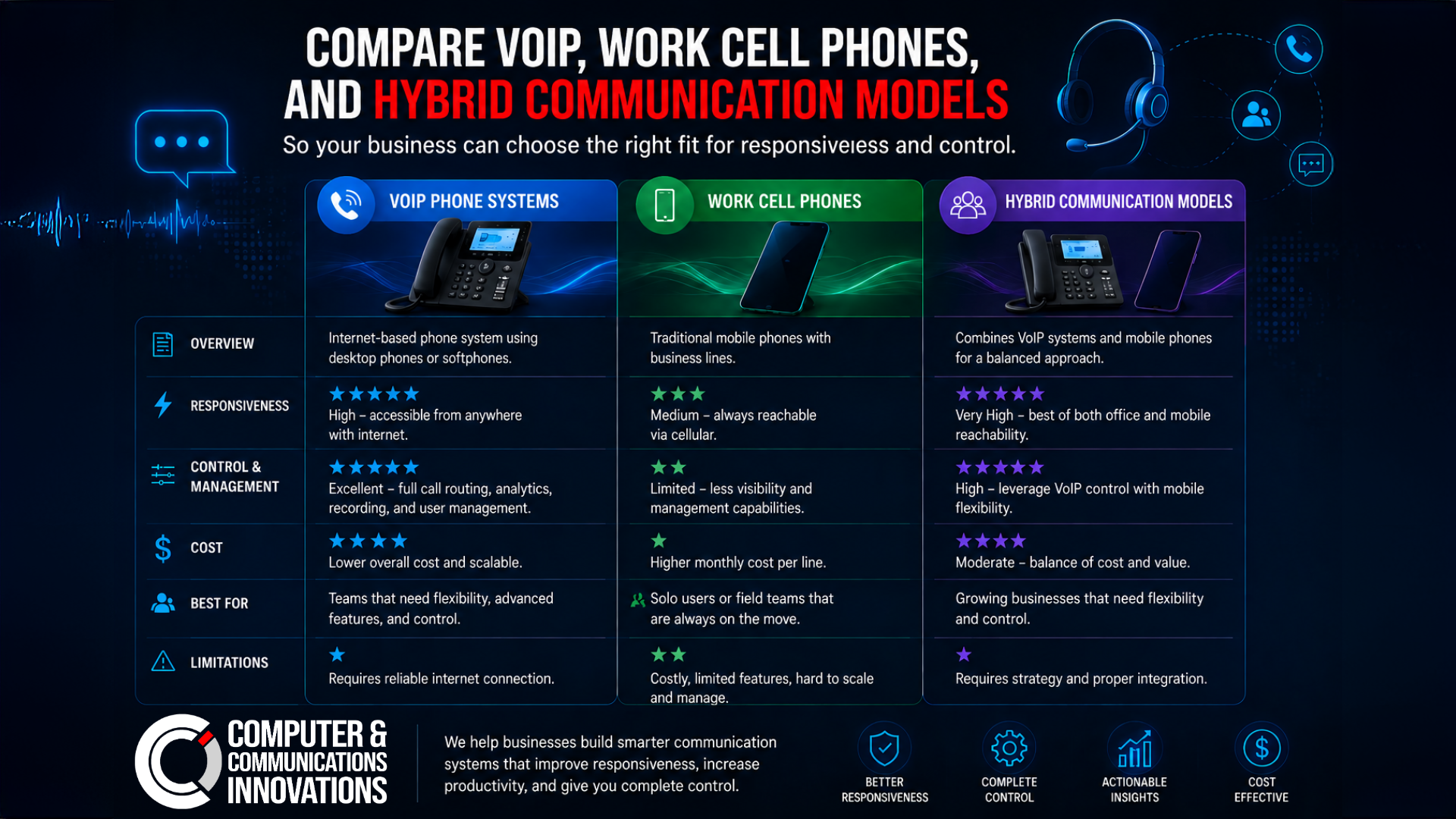
VoIP works well when the business needs structure.
That can include:
main numbers and extensions
call routing
voicemail handling
ring groups
after-hours rules
transfer workflows
visibility across a team
easier handoff when someone is unavailable
For businesses that want professionalism, centralization, and a cleaner customer experience, VoIP often provides a stronger operational backbone than relying only on individual mobile numbers.
It is especially useful when calls need to reach the right person consistently instead of depending on whoever happens to answer first.
What Work Cell Phones Do Best
Cell phones shine when mobility matters.
They are often the better fit for:
field staff
sales roles
technicians on the move
owners who travel constantly
teams that need text-heavy communication
roles where location changes all day
Mobile communication is flexible and fast. It meets people where the work happens.
The challenge comes when the business wants more visibility, consistency, and control than cell-only communication naturally provides.
Where Cell-Only Setups Start to Hurt
If a business depends only on employee mobile numbers, common problems include:
inconsistent call handling
weak visibility into missed opportunities
poor handoff when someone is out
difficulty standardizing voicemail and greetings
limited team routing
confusion when staff leave
business communication living on personal devices or habits
That does not mean cell phones are wrong. It means they should be part of a broader communication plan when the business needs coordination.
Why Many Businesses End Up with Both
For a lot of organizations, the strongest answer is a hybrid model.
That might look like:
a VoIP system for the main business number and team workflows
mobile apps or forwarding for staff who move around
company-issued phones for certain roles
personal devices with clear policy and approved apps for others
voicemail, texting, and routing handled consistently
This approach gives the business structure without trapping employees behind a desk.
Questions That Help Clarify the Right Fit
Before choosing a direction, ask:
Do customers call one main number or reach employees directly?
Do we need call routing, call groups, or after-hours handling?
How often are employees away from desks?
How important is business texting?
Do we need reporting or visibility into call flow?
What happens when an employee leaves?
Are we mixing personal and business communication too loosely?
These questions reveal whether the business needs more centralization, more mobility, or a blend of both.
Policy Matters Too
Phone strategy is not just hardware. It is policy.
If your team uses cell phones for work, define:
who gets company-issued devices
whether personal devices are allowed
how texting should be handled
what happens to communication records
how accounts are secured
how access is removed when roles change
Without those rules, the business can end up dependent on individual habits instead of a repeatable communication model.
The Best Phone Setup Supports the Customer Experience
Customers care less about what technology you chose and more about what it feels like to reach your business.
Do calls get answered? Routed properly? Returned quickly? Handled professionally? Can the right person be reached without a tiny maze of voicemail despair?
That is the real benchmark.
Match the System to the Way the Team Works
VoIP is not old-fashioned. Cell phones are not automatically modern. Both are useful. The right answer depends on the work itself.
Computer & Communication Innovations helps businesses evaluate communication workflows, device strategy, and support needs so the phone setup matches reality instead of fighting it. Because the best business communication system is the one that helps your team stay responsive, organized, and easy to reach without creating a new tangle in the process.